Mantravali / Apps / PasteFix

PasteFix
Mac · Coming soon
PasteFix lives in your Mac menu bar and tidies what you copy before you paste it. It is for anyone who moves text between apps all day and is tired of stray quotes, odd spacing and borrowed formatting.
What it does
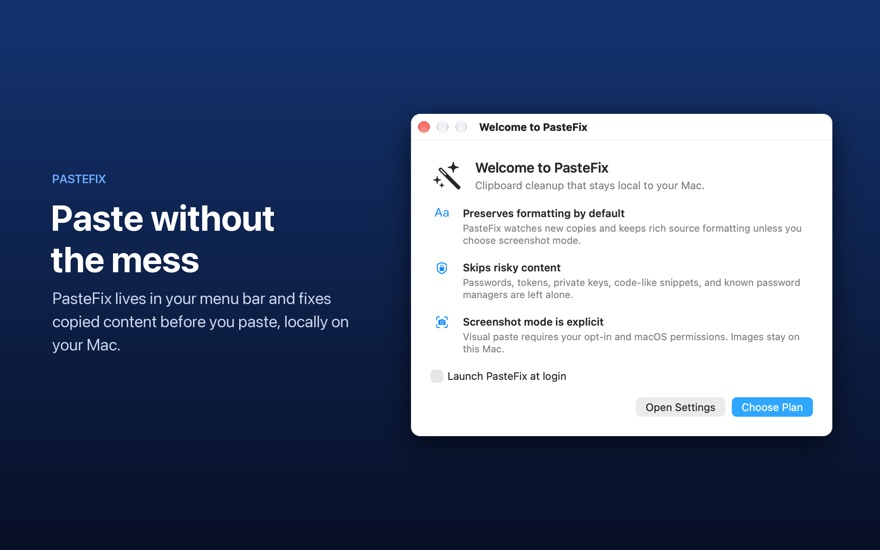
- Keeps useful formattingBy default PasteFix watches new copies and preserves the source's rich formatting, so you only strip it when you choose to.
- Cleans copied textTurns curly quotes and long dashes into plain ones, fixes odd spacing, converts bullet glyphs to simple dashes and tidies tabbed rows. Each rule has its own switch.
- Removes link trackingOptionally strips tags such as utm_source and fbclid from copied links.
- Formats the clipboard on demandMenu tools convert copied text to Markdown, a quote block, a code block or a Markdown table, and change its case.
- Skips sensitive contentPasswords, tokens, private keys and one-time codes are left untouched, and known password managers are excluded by default. You can also exclude any app.
- Private and reversibleClipboard content is processed on your Mac and is not sent to PasteFix servers. Undo Last Fix brings back the original clipboard.
Screenshots

Get one email when PasteFix launches
No newsletter and no spam. Your address is only used for this one email, then deleted.
See the privacy notice.
Guides
How to Paste Text Without Formatting on Mac (and Fix Messy Text)